After downloading the upgrade file, click on the file, and follow these instructions to complete. Remember the upgrade process will un-install the current edition for you, you do not need to un-install it yourself.
Quick Heal 2009 Upgrade Process
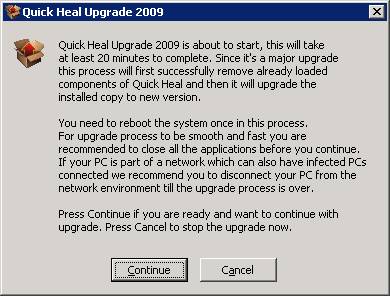
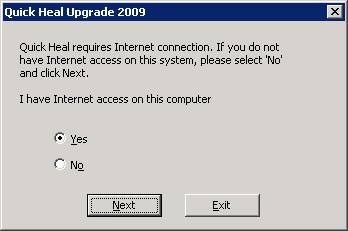
Quick Heal Upgrade 20009 will require internet connection to obtain a new serial number against old serial number.
NOTE: The new Quick Heal 2009 (version 10) serial number and activation numbers are very different from previous version. You may want to print out these new numbers for your reference and safe keeping. Here's how: Open your Quick Heal software. On the left side of the status page Click on About. Then Click on License Details, and Print License Details.
If you are unable to connect to the internet and/or you have selected No on the above window,
continue with the instructions below:
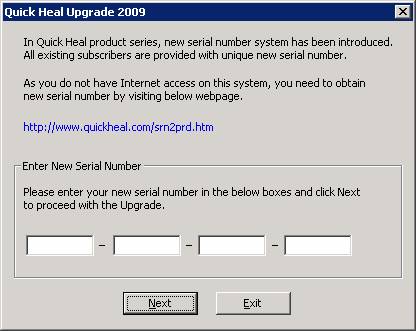
· Here You need to obtain new serial number against your old serial number by visiting below website.
http://www.quickheal.com/srn2prd.htm
You will need to enter their existing serial number and activation number to obtain a new serial number.
· You will able to proceed with the upgrade once he enters new serial number.
· Clicking on Next will uninstall old version and install and activate new version with new serial number.
NOTE: The new Quick Heal 2009 (version 10) serial number and activation numbers are very different from previous version. You may want to print out these new numbers for your reference and safe keeping. Here's how: Open your Quick Heal software. On the left side of the status page Click on About. Then Click on License Details, and Print License Details.